> For the complete documentation index, see [llms.txt](https://docs.crowdwork.com/llms.txt). Markdown versions of documentation pages are available by appending `.md` to page URLs; this page is available as [Markdown](https://docs.crowdwork.com/for-theatres/email-marketing/templates-and-asset-library.md).
# Templates & the Asset Library
Start campaigns faster with starter layouts and your own saved templates, and manage the reusable images in your Asset Library.
Two areas of the **Emails** section exist to make your next campaign faster than your first: **Templates** (reusable layouts) and the **Asset Library** (reusable images). Both live in the Emails section of your Dashboard sidebar.
***
## Templates
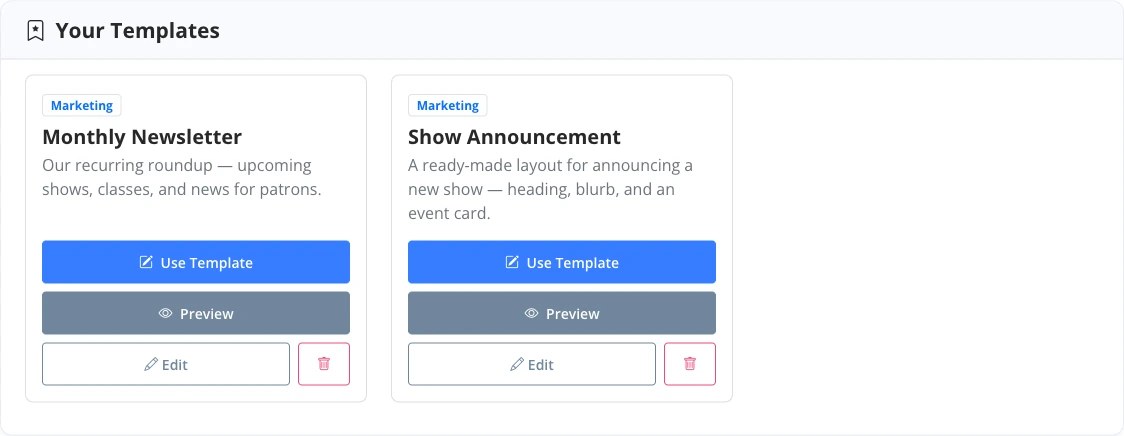
A **template** is a saved campaign layout — blocks, styling, and structure — you can start new campaigns from. The **Templates** page is your library: it includes CrowdWork's **starter templates** (ready-made layouts like a show announcement, a monthly newsletter, or a holiday gift card push) alongside any templates your theatre has saved.
### Starting a campaign from a template
When you create a new campaign, pick **Use Template**, choose a template, and customize from there — the fastest route to a consistent look for a recurring newsletter.
### Saving your own
Built a layout worth repeating? In the builder, choose **Save as Template**. If your campaign began from one of your own templates, you can also push your improvements back with **Update** — or keep the original intact and **Save as new template**.
Starter templates and your theatre's saved templates in the Templates library
{% hint style="success" %}
**Templates vs. Duplicate.** A template is a reusable starting point; duplicating a campaign copies one specific past send, content and all. For a recurring newsletter, a template keeps the frame while you swap the content each time.
{% endhint %}
***
## The Asset Library
The **Asset Library** holds the images you use in campaigns — logos, promo art, venue photos. Upload once, reuse everywhere: when you add an **Image** block, you can pick from the library or upload something new (which joins the library for next time).
* **Formats:** JPG, PNG, GIF, and WebP
* **Size:** up to 5 MB per image
Each image in the library lists its filename, dimensions, file size, type, and upload date, so you can check that a photo is the right shape and size before it goes into a campaign. The same details show in the picker when you're choosing an image for an **Image** block.
### Deleting an image
You can delete images you no longer need. If an image is still used by a campaign that's in progress, CrowdWork blocks the delete and tells you which campaigns to update first — so you can't accidentally blank out an email that's mid-flight.
The Asset Library, showing uploaded images ready to reuse
***
## Related Tasks
| Task | Guide |
| ---------------------------------------- | ------------------------------------------------------------------------------------------------------------------ |
| **Build and send a marketing campaign** | [Building a Campaign](https://docs.crowdwork.com/for-theatres/email-marketing/building-a-campaign) |
| **Understand the two campaign types** | [Email Marketing](https://docs.crowdwork.com/for-theatres/email-marketing) |
| **Read a campaign's report and revenue** | [Campaign Reports & Revenue](https://docs.crowdwork.com/for-theatres/email-marketing/campaign-reports-and-revenue) |
***
## Need Help?
If you run into a situation this guide doesn't cover, [contact our support team](https://docs.crowdwork.com/contacting-support) from your Dashboard. We're here to help!