# Ghost - Embed Guide

Ready to showcase your shows and classes directly on your Ghost website? Perfect! Ghost's clean, publication-focused design pairs beautifully with CrowdWork widgets to promote your theater events alongside your content.

### ✅ What You'll Need

Before you begin, make sure you have:

* An active CrowdWork account
* A Ghost website you can edit (with appropriate permissions)
* Your widget embed code from CrowdWork Dashboard
* About 5 minutes of your time

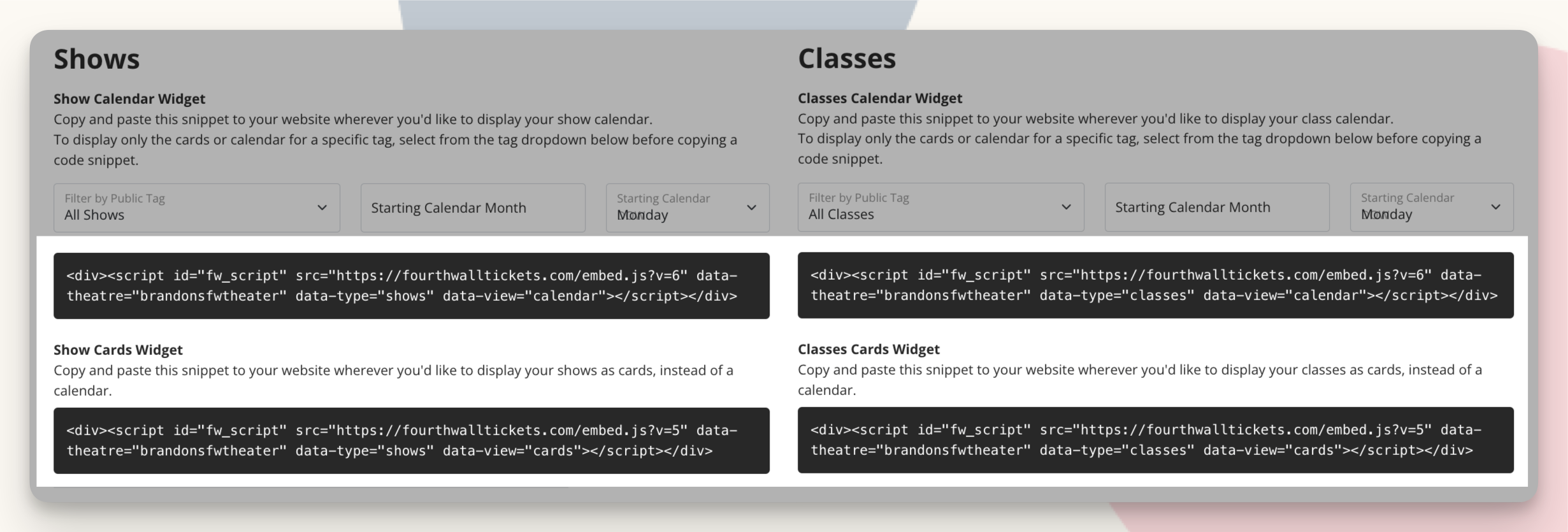
<figure><img src="/files/w8LaKpI606sCrIRQHb05" alt=""><figcaption><p>The Embed Widget code provided in the CrowdWork Dashboard</p></figcaption></figure>

### 👾 Getting Your Widget Code

First, let's grab your widget code from CrowdWork:

1. Log in to your CrowdWork Dashboard
2. Navigate to [**Theatre > Embeds**](https://www.crowdwork.com/dashboard/embeds) in the left menu
3. Choose the widget type (Shows or Classes)
4. Select your preferred view (Calendar or Cards)
5. Customize any settings (tag filtering, start date, etc.)
6. Copy the code snippet provided in the box

{% hint style="info" %}
**Quick Access:** Jump directly to your [**widget customization page**](https://www.crowdwork.com/dashboard/embeds) to get started immediately!
{% endhint %}

### 🚀 Adding Your Widget to Ghost

Ghost offers several flexible ways to add custom code. Choose the method that works best for your needs:

#### Method 1: Using HTML Cards in Posts/Pages (Recommended)

Perfect for adding widgets to specific posts or pages:

{% hint style="info" %}
**Ghost Tip:** Have your widget code from the [**Theatre > Embeds Dashboard**](https://www.crowdwork.com/dashboard/embeds) ready to paste before starting.
{% endhint %}

1. **Open the Ghost Editor**
   * Create a new post/page or edit an existing one
   * Position your cursor where you want the widget
2. **Add an HTML card**
   * Type `/html` to bring up the HTML card option
   * Or click the `+` button and select **HTML** from the card menu
3. **Paste your widget code**
   * Paste your complete CrowdWork widget code into the HTML card
   * Make sure you include the entire `<script>` tag
   * Click outside the card to save
4. **Preview and publish**
   * Use the preview function to see how your widget looks
   * Publish your post/page to make it live

#### Method 2: Site-Wide Code Injection

For widgets that should appear on every page:

1. **Access Code Injection settings**
   * Go to **Settings** in your Ghost admin
   * Click on **Code Injection** in the sidebar
2. **Choose injection location**
   * **Site Header**: For CSS or scripts that need to load early
   * **Site Footer**: For widgets and tracking scripts (recommended for CrowdWork)
3. **Add your widget code**
   * Paste your CrowdWork widget code in the appropriate section
   * For widgets, the Site Footer is usually the best choice
4. **Save your changes**
   * Click **Save** to apply the code site-wide

#### Method 3: Post/Page-Specific Code Injection

For widgets on specific posts or pages only:

1. **Open post/page settings**
   * In the Ghost editor, click the settings gear icon
   * Scroll down to find the **Code Injection** section
2. **Choose code placement**
   * **Post/Page Header**: For page-specific CSS or scripts
   * **Post/Page Footer**: For widgets (recommended)
3. **Add your widget code**
   * Paste your CrowdWork widget code in the appropriate field
   * This will only affect the current post/page
4. **Save and publish**
   * Save your post/page to apply the changes

### 💄 Making Your Widget Look Amazing

Ghost's clean design aesthetic works beautifully with CrowdWork widgets:

#### Content Integration

* **Contextual placement**: Add widgets near relevant content about shows or classes
* **Visual breathing room**: Use Ghost's spacing to give widgets adequate space
* **Typography harmony**: Widgets will inherit Ghost's clean typography approach
* **Mobile responsiveness**: Ghost's responsive design works seamlessly with widgets

#### Design Best Practices

* **Full-width sections**: Calendar widgets look best in full-width Ghost sections
* **Sidebar placement**: Card widgets work well in Ghost theme sidebars
* **Article integration**: Embed relevant show schedules within blog posts
* **Landing pages**: Create dedicated event pages with prominent widget placement

### 🔧 Troubleshooting

{% hint style="info" %}
**Need fresh code?** You can always get updated widget code from your [**Theatre > Embeds Dashboard**](https://www.crowdwork.com/dashboard/embeds) if something isn't working right.
{% endhint %}

**Widget not showing up in HTML cards?**

* Make sure you've published the post/page, not just saved it
* Verify you pasted the complete code snippet including `<script>` tags
* Try viewing the published page in an incognito browser window
* Check that your Ghost plan supports HTML cards (most do)

**Code injection not working?**

* Ensure you have the necessary permissions to edit site settings
* Check that you saved the code injection settings
* Verify the code is in the correct section (Header vs Footer)
* Clear your browser cache and check the published site

**Widget appears but looks broken?**

* Ensure adequate space - calendar widgets need more height than cards
* Check for theme conflicts by testing with a default Ghost theme
* Verify your Ghost theme supports the styling requirements
* Try adding the widget to a different location to isolate the issue

**Mobile display issues?**

* Test on actual mobile devices, not just browser dev tools
* Check that your Ghost theme is fully responsive
* Calendar widgets automatically adapt to mobile but may need theme adjustments

### 🎯 Creative Uses for Ghost + CrowdWork

Leverage Ghost's publishing power:

#### Content Strategy Integration

* **Event announcements**: Embed show schedules in announcement posts
* **Class promotion**: Add class calendars to educational content
* **Newsletter integration**: Include widgets in Ghost's email newsletters
* **Member content**: Use Ghost's membership features with event promotion

#### Publication Workflow

* **Editorial calendar**: Coordinate content publishing with show schedules
* **Author-specific content**: Add instructor-specific class schedules to author pages
* **Category organization**: Use Ghost tags to organize event-related content
* **SEO optimization**: Combine Ghost's SEO features with event promotion

#### Community Building

* **Member-only events**: Use Ghost's membership tiers for exclusive event access
* **Comment integration**: Encourage discussion about upcoming shows
* **Social sharing**: Leverage Ghost's built-in social features for event promotion

### 📝 Ghost-Specific Tips

Make the most of Ghost's unique features:

#### Theme Compatibility

* **Official themes**: Most official Ghost themes work perfectly with widgets
* **Custom themes**: Test widgets thoroughly when using custom themes
* **Theme updates**: Widgets in HTML cards won't be affected by theme changes
* **Code injection**: Site-wide injection survives theme updates

#### Performance Optimization

* **Lazy loading**: Ghost's modern themes support lazy loading with widgets
* **CDN integration**: Ghost's CDN works seamlessly with widget content
* **Caching**: Widget updates appear immediately despite Ghost's caching

#### Publishing Workflow

* **Scheduled posts**: Include widgets in scheduled Ghost posts
* **Draft previews**: Test widget placement in Ghost's preview mode
* **Collaboration**: Team members can see widgets in Ghost's collaborative editor

### 🔄 Automatic Updates

Once embedded, your widget automatically syncs with your CrowdWork account. Any changes to shows or classes appear immediately on your Ghost site without any additional work!

### 📧 Newsletter Integration

Ghost's powerful newsletter features work great with event promotion:

* **Event announcements**: We recommend including screenshot images of your event widgets and placing them directly into your Ghost email newsletters so your site visitors recognize the events immediately
* **Member engagement**: Send targeted event information to specific member tiers and offer custom passwords or [Discount Codes](/for-theatres/setting-up-discount-codes.md) for exclusive pricing
* **Automated promotion**: Use Ghost's automation features for event marketing

### 📱 Mobile & Performance

Ghost's modern architecture ensures great performance:

* **Responsive design**: Ghost themes are mobile-first and work perfectly with widgets
* **Fast loading**: Ghost's optimized loading works well with widget content
* **Progressive web app**: Ghost's PWA features enhance widget interactivity

Need further assistance? [Reach out to our Support Team](/contacting-support.md) - we're always happy to help!


---

# Agent Instructions: Querying This Documentation

If you need additional information that is not directly available in this page, you can query the documentation dynamically by asking a question.

Perform an HTTP GET request on the current page URL with the `ask` query parameter:

```
GET https://docs.crowdwork.com/the-academy/crowdwork-academy/embedding-widgets-on-specific-platforms/ghost-embed-guide.md?ask=<question>
```

The question should be specific, self-contained, and written in natural language.
The response will contain a direct answer to the question and relevant excerpts and sources from the documentation.

Use this mechanism when the answer is not explicitly present in the current page, you need clarification or additional context, or you want to retrieve related documentation sections.