> For the complete documentation index, see [llms.txt](https://docs.crowdwork.com/llms.txt). Markdown versions of documentation pages are available by appending `.md` to page URLs; this page is available as [Markdown](https://docs.crowdwork.com/for-ticket-holders/readme.md).
# FAQs for Ticket Holders
Welcome to our frequently asked questions (FAQs) section for ticket holders. We hope to provide you with helpful information to enhance your experience with CrowdWork.
{% hint style="warning" %}
**Note to Ticket Holders and Students**
For *exchanges, refunds*, and *questions about tickets or events*, please **reach out to the theatre directly**. This will allow you to receive assistance more quickly.
{% endhint %}
{% hint style="info" %}
**Are you a theatre admin?** If a patron contacted you with an issue, see our [Helping Your Patrons](https://docs.crowdwork.com/for-theatres/helping-your-patrons) guide for step-by-step resolution instructions and ready-to-send messages for your patrons.
{% endhint %}
### Help, I Bought a Ticket to the Wrong Show/Date!
If you find yourself needing to change your ticket for any reason, please contact the theater directly. The theater has the ability to manage exchanges and refunds to ensure you get the support you need promptly.
### Oops! I Signed Up with the Wrong Email Address
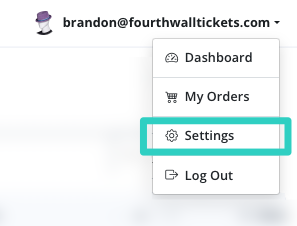
No worries! If you created a password during checkout, you can still log in with the wrong email address and the password you set. Once logged in, go to [crowdwork.com/account](https://crowdwork.com/account) and click on the email address drop-down menu near the top. Select "Settings," where you will have the option to correct your email address.
### I Lost or Didn't Receive My Ticket Confirmation Email
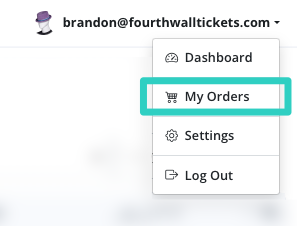
Easy, just login to your account at [crowdwork.com/account](https://crowdwork.com/account) from the user menu select My Orders then the show name and click the "Re-send Confirmation Email" button.
| 1. Select My Orders | 2. Pick the Show | 3. Click Re-Send |
| :----------------------------------------------------------------------------------------------------------------------------------------------------------------------------------------------------------------------------------: | :----------------------------------------------------------------------------------------------------------------------------------------------------------------------------------------------------------------------------------------: | :---------------------------------------------------------------------------------------------------------------------------------------------------------------------------------------------------------------------------------------------: |
|  |  |  |
However, sometimes when this happens, it's because you might have accidentally had a typo or entered the wrong email address when purchasing your tickets. To resolve this issue, first make sure you entered the correct email address. Try logging in at [crowdwork.com/account](https://crowdwork.com/account) or perform a password reset to access your account.
Once logged in, follow the first suggestion by going to My Orders, find the show name, and clicking "Re-Send Confirmation Email" button.
And if none of that works, contact the theater directly, and they can resend your ticket order confirmation email.
### My Payment Was Declined, or I Have No Card on File
If a recurring charge for a membership or payment plan was declined, you can fix it yourself from your account at [crowdwork.com/account/payment-methods](https://crowdwork.com/account/payment-methods). Your cards are grouped by theatre and by what they're used for — Payment Plans and Enrolled Memberships.
* **If you have no card on file**, click "Add Card" under the relevant heading to add one for your upcoming payments.
* **If you already have a card on file**, click "Replace Card" to update it.
Once your card is added or updated, we'll automatically use it for your next scheduled charge. For the full walkthrough, including what happens to a payment that already failed, see [Update the Card on File for a Membership or Payment Plan](/for-ticket-holders/updating-your-payment-card.md).
{% hint style="warning" %}
**Seeing nothing at all on that page?** No cards, no theatre headings, no buttons — that usually means your purchase isn't connected to the account you're signed in to, and it isn't something you can fix yourself. [Contact CrowdWork support](/contacting-support.md) and include the email address you used when you bought.
{% endhint %}
The Payment Methods page with an Add Card button shown when no card is on file
{% hint style="info" %}
**Which card gets charged?** A membership or payment plan is charged to the card saved for it, and only that card. If it's declined we try the same card again on the next attempt — we don't switch to another card on your account, even one saved under a different heading. So if a payment has failed, replacing that card is what fixes it.
{% endhint %}
### Can I Pay with Apple Pay or Google Pay?
Often, yes. If the theatre you're buying from processes payments through Square, you'll see a **Pay with** choice at checkout — **Card**, plus **Apple Pay** and **Google Pay** wherever your device and browser support them. Apple Pay is selected for you when it's offered, and Google Pay is on an Android device; tap another option to switch. They also show up when you make a donation or buy a gift card.
If you don't see it, one of these is why:
* **You're buying with a payment plan.** Plans need a credit or debit card, because we charge that same card again on each future installment date. Ticking **Pay via payment plan** removes the Apple Pay and Google Pay options and tells you so.
* **You're buying a membership**, for the same reason — a membership renews on a schedule, so it needs a card saved on file.
* **The theatre uses a different payment processor.** Apple Pay and Google Pay are part of our Square integration; theatres on Stripe take cards.
* **Your device or browser doesn't support it** — the wallet simply doesn't appear, and you can pay by card as normal.
Either way you get the same ticket and the same confirmation email.
### When I Login All I See is "Your Theatre Dashboard" / Can't Find My Ticket Order
If you see "Your Theatre Dashboard" when you login and can't locate your ticket order, this means you're currently on the Theatre Dashboard. To switch to view your ticket orders, please visit [crowdwork.com/account](https://crowdwork.com/account), or click your email address at the top of the page, and then select "My Orders" from the drop-down menu.
By default, everyone who purchases tickets via CrowdWork has an account that also allows them to sell tickets. You can easily switch between Theatre **Dashboard** and **My Orders** using the drop-down menu.
### **How Do I Change My Password?**
You can change your password by performing a password reset from the login screen at [crowdwork.com/account](https://crowdwork.com/account). Alternatively, once logged in, go to the "Settings" menu, where you will find an option to change your password.
### How Do I Delete My Account?
If you need to delete your account, please contact our support team [using this contact form](/contacting-support.md). We will be happy to assist you with this request.
### How Do I Opt Out of the Email List?
We, CrowdWork, do not keep an email list of users who have purchased a ticket or registered for a class. However, the theater you purchased from may have their own email lists. In that case, we recommend you click the unsubscribe link in any of the newsletters or contact the theater directly for removal.
### How Do I Pick My Seats?
When a theatre uses assigned seating for a show, checkout opens on **Pick Your Seats**. Tap the seats you want on the map. Each one is added to **Your seats** with its ticket type, and if more than one ticket type is available in that section, you choose one there. To drop a seat, remove it from the list.
* **Your seats are held for 10 minutes** while you check out, with a countdown at the top. The 10 minutes start over when you move on to payment. If the time runs out, the seats are released and you can pick again.
* **Accessible seats** are reserved for patrons who need them. If you pick one, you'll be asked to confirm that someone in your party needs it before you pay.
* **Your seat is on your confirmation email, your ticket, and your Apple Wallet pass**, shown with its section, row, and number, like **Orchestra • A5**. You can also see it on your order in your account.
If you bought at the door or the box office added your ticket, your seat was chosen for you. Need a different seat? Contact the theatre, which can move you.
### How Do Waitlists Work?
When a show or class is sold out, you may see a **"Join Waitlist"** button instead of the usual ticket purchase button. Here's what to know:
* **Joining a waitlist** — Click the button and confirm to add yourself to the waitlist for that specific date and time. You'll need to be logged in or create an account.
* **What happens next** — If a spot opens up, the theatre may send you an email inviting you to purchase a ticket. This email will include a link to the event page.
* **No guarantees** — Being on a waitlist doesn't guarantee you'll get a ticket. It simply means you'll be notified if the opportunity arises.
* **Check your email** — If you're on a waitlist for an event you really want to attend, keep an eye on your inbox! Spots can fill up quickly when they become available.
{% hint style="info" %}
**Tip:** Make sure your email address is correct in your account settings so you don't miss any notifications!
{% endhint %}
### Need Additional Help?
For any other questions or assistance, feel free to [reach out to us](/contacting-support.md) or contact the theatre directly.